 Henrique Matos
October 25, 2026 · 44 min read
50 things I wish I'd known earlier

This is the list I wish someone had handed me when I started putting SaaS products on my own VPS. None of these ideas is new, but most of us only take them seriously after they break in production: the bug that never happens on your laptop, the deploy that takes the app down for a few seconds, the customer who gets charged twice.
It's 50 backend concepts, grouped by theme. Each one comes with an everyday analogy when it helps, a snippet in Node and Postgres, and at the end the solution I'd pick today and why. You don't have to read it in one go: it works better as a guide to come back to when the problem shows up.
Concurrency and transactions
Almost every "only happens in production" bug starts here: two requests touching the same data at the same time.
1. Race conditions
Two concurrent operations read and write the same data, and the result depends on who gets there first.
Analogy: two cashiers sell the last ticket at the same time, because both saw "1 available".
// WRONG: read, then write. Two requests read stock=1 and both sell
const { rows: [p] } = await db.query('SELECT stock FROM products WHERE id = $1', [id]);
if (p.stock > 0) await db.query('UPDATE products SET stock = stock - 1 WHERE id = $1', [id]);

// RIGHT: one atomic operation, the database decides
const r = await db.query(
  'UPDATE products SET stock = stock - 1 WHERE id = $1 AND stock > 0 RETURNING stock', [id]);
if (r.rowCount === 0) throw new Error('Sold out');
Best solution: push the guarantee down to the database, with a conditional UPDATE (
WHERE stock > 0), a UNIQUE constraint, orSELECT ... FOR UPDATEwhen the logic is more complex. Why: the database runs each write atomically, so the window between reading and writing, where the other request slips in, disappears. In-memory locks in Node don't fix it: with two instances, each one has its own memory and the problem comes back.
2. Deadlocks
Two transactions wait for each other forever. Postgres detects it and kills one of them with a deadlock detected error.
Analogy: two cars on a narrow crossing, each waiting for the other to back up.
-- T1: UPDATE accounts SET balance = balance - 10 WHERE id = 1;  -- locks account 1
-- T2: UPDATE accounts SET balance = balance - 10 WHERE id = 2;  -- locks account 2
-- T1: UPDATE accounts SET balance = balance + 10 WHERE id = 2;  -- waits for T2
-- T2: UPDATE accounts SET balance = balance + 10 WHERE id = 1;  -- waits for T1 -> deadlock
How to avoid it: always lock in the same order (for example, ascending id), keep transactions short, and retry when the error shows up.
Best solution: always access and lock rows in the same order (for example, sort the ids before the UPDATEs), keep transactions short, and wrap the transaction in an automatic retry for error
40P01. Why: a deadlock only happens when two transactions lock resources in opposite orders; with a fixed order, one simply waits for the other. Since a rare deadlock can still show up under load, the retry turns the error into a few milliseconds of delay the user never notices.
3. Database transactions
A group of operations that happens completely or not at all.
Analogy: a bank transfer. Debit and credit, or neither.
const client = await pool.connect();
try {
  await client.query('BEGIN');
  await client.query('UPDATE accounts SET balance = balance - 100 WHERE id = $1', [from]);
  await client.query('UPDATE accounts SET balance = balance + 100 WHERE id = $1', [to]);
  await client.query('COMMIT');
} catch (e) {
  await client.query('ROLLBACK');
  throw e;
} finally {
  client.release();
}
Best solution: a short transaction that wraps only the writes that must happen together, with no HTTP calls, emails or uploads inside; those side effects run after the COMMIT, through a queue or an outbox. Why: while it's open, the transaction holds locks and takes a connection from the pool. Put an API that takes 10 seconds inside it, and other requests get blocked and the pool runs dry.
4. ACID properties
The four guarantees of a transaction:
- Atomicity: all or nothing.
- Consistency: the database moves from one valid state to another (constraints always hold).
- Isolation: concurrent transactions don't get in each other's way (topic 5).
- Durability: after COMMIT, the data survives a power cut (written to the WAL on disk).
Example: at checkout, create order + order_items + decrement stock in a single transaction. If the server dies halfway, nothing is left half done.
Best solution: use an ACID database like Postgres as the single source of truth, and treat Redis, search indexes and queues as derived copies you can rebuild. Add automatic, tested backups stored outside the VPS (pgBackRest or a scheduled
pg_dump). Why: if a cache or queue loses data, you rebuild it from the database; if the database loses data, there's nowhere to recover it from. It's the cheapest way to never lose customer data.
5. Isolation levels
How much a transaction "sees" of other transactions still in progress. More isolation means fewer anomalies, but more conflicts and retries.
| Level | What it guarantees | Cost |
|---|---|---|
| Read Committed (Postgres default) | Only reads committed data; reading twice can return different values | Low |
| Repeatable Read (MySQL default) | The transaction sees a fixed "snapshot" of the database from start to finish | Medium; conflicts raise errors |
| Serializable | Same result as running one transaction at a time | High; needs retries |
There's also Read Uncommitted (reads uncommitted data), but in Postgres it behaves like Read Committed.
-- rule: at most 1 doctor on call per day
BEGIN ISOLATION LEVEL SERIALIZABLE;
SELECT count(*) FROM on_call WHERE day = '2026-10-25';  -- returns 0
INSERT INTO on_call (day, doctor) VALUES ('2026-10-25', 'ana');
COMMIT;
-- if another transaction did the same in parallel, one gets error 40001 and retries.
-- under Read Committed, both would pass and the day would have 2 doctors on call.
Best solution: keep the default Read Committed for the vast majority of operations, and go up to Serializable, with a retry on error
40001, only where a rule spans several rows (plan limits, schedules, aggregated balances). Why: maximum isolation everywhere brings more conflicts, more retries and less throughput, with no gain on most screens. In the few places with cross-row rules, Serializable is exactly what prevents anomalies no unit test will catch.
6. Optimistic locking
Locks nothing. It keeps a version column and, at save time, checks that nobody changed the row first. If someone did, it fails and the user or the code tries again. Ideal when conflicts are rare (profiles, documents, settings).
Analogy: the wiki that warns "someone edited this page while you were writing".
const r = await db.query(
  `UPDATE documents SET content = $1, version = version + 1
   WHERE id = $2 AND version = $3`, [content, id, versionRead]);
if (r.rowCount === 0) throw new ConflictError('Changed by someone else'); // HTTP 409
Best solution: a
versioncolumn (orupdated_at) sent along with the form and checked in the UPDATE'sWHERE, returning HTTP 409 when it doesn't match, so the UI can warn the user and offer to reload. Why: edits in a form rarely conflict and have long gaps while the person is thinking, and locking the row all that time isn't an option. It costs one column and one error handler, and nobody's change gets silently overwritten.
7. Pessimistic locking
Locks the row when it's read, and everyone else waits. Ideal when conflicts are frequent or expensive (balances, stock, bookings).
Analogy: taking the bathroom key. Nobody goes in until you bring it back.
BEGIN;
SELECT balance FROM wallets WHERE user_id = 42 FOR UPDATE;  -- others wait here
UPDATE wallets SET balance = balance - 50 WHERE user_id = 42;
COMMIT;  -- releases the row
Tip: FOR UPDATE SKIP LOCKED is great for queues in Postgres. Each worker grabs a different job without waiting for the others.
Best solution:
SELECT ... FOR UPDATEinside a short transaction for balances, stock, seats and bookings, andFOR UPDATE SKIP LOCKEDwhen several workers compete for items in a queue. Why: when a conflict is likely, waiting your turn for a few milliseconds is cheaper than failing and retrying several times. The condition is a short transaction; a lock held for seconds becomes a waiting line for the whole system.
Database performance
Most slowness in a SaaS lives in the database, and it's almost always fixed with the right index, fewer queries and a well-sized pool.
8. Connection pooling
Opening a database connection is expensive (handshake, authentication, a new process in Postgres). The pool keeps N connections open and lends one out for each query.
Analogy: a fleet of taxis waiting at the stand, instead of building a car for every ride.
import pg from 'pg';
const pool = new pg.Pool({ max: 20, idleTimeoutMillis: 30_000, connectionTimeoutMillis: 2_000 });
await pool.query('SELECT 1'); // takes and returns the connection automatically
On a VPS: Postgres has max_connections (default 100). Four app instances with a pool of 20 already use 80. With many instances, put PgBouncer in front.
Best solution: one pool per process, sized so the total across all instances stays below
max_connectionswith room for migrations and manual access, and a short acquire timeout; when the number of instances grows, PgBouncer in transaction mode. Why: each Postgres connection is a process that uses memory, and more connections doesn't mean more speed. Past a few dozen, the database wastes time switching between them, so a small, well-used pool is usually faster than a big one.
9. N+1 queries
Fetch a list (1 query), then run one query per item (N queries).
Analogy: going to the supermarket 50 times to buy 50 items.
// WRONG: 1 + 50 queries
const posts = (await db.query('SELECT * FROM posts LIMIT 50')).rows;
for (const p of posts) {
  p.author = (await db.query('SELECT * FROM users WHERE id = $1', [p.user_id])).rows[0];
}

// RIGHT: 2 queries (or a JOIN)
const ids = posts.map(p => p.user_id);
const users = await db.query('SELECT * FROM users WHERE id = ANY($1)', [ids]);
In ORMs, use eager loading (include in Prisma, with in Drizzle). In GraphQL, use DataLoader.
Best solution: load relations in batches (a JOIN,
WHERE id = ANY($1)or the ORM's eager loading), use DataLoader in GraphQL, and turn on query logging in development. Why: every round trip to the database costs network latency, so 2 queries beat 51 even when each one is fast. The dev log shows the problem the moment it's born, before the table grows and the endpoint gets slow in production.
10. Database indexes
A structure (usually a B-tree) that lets you find rows without reading the whole table.
Analogy: the index at the back of a book.
-- frequent lookup: a tenant's orders, newest first
CREATE INDEX CONCURRENTLY idx_orders_tenant_created
  ON orders (tenant_id, created_at DESC);

-- partial index: only index what matters
CREATE INDEX idx_jobs_pending ON jobs (run_at) WHERE status = 'pending';
Cost: every index makes INSERT and UPDATE slower and takes disk space. In a composite index, order matters: (tenant_id, created_at) works for filtering by tenant, but not for filtering by date alone.
Best solution: create indexes from real queries (via
pg_stat_statementsand EXPLAIN), with composites in filter order (equality first, then sort or range), and every now and then review the ones that are never used inpg_stat_user_indexes. Why: the right index turns seconds into milliseconds, but an unused index just takes disk and slows every write. In a multi-tenant SaaS, almost every important index starts withtenant_id.
11. Query optimization
Make the database do less work. A quick checklist:
- Select only the columns you'll use; avoid
SELECT *on wide tables. - Don't wrap the indexed column in a function:
WHERE lower(email) = ...ignores the index onemail(create the index onlower(email)). - Filter and aggregate in the database, not in JavaScript.
- Use cursor pagination instead of a large
OFFSET.
-- slow: OFFSET 100000 reads and throws away 100k rows
SELECT * FROM events ORDER BY id LIMIT 20 OFFSET 100000;

-- fast: cursor (keyset) pagination
SELECT * FROM events WHERE id > $1 ORDER BY id LIMIT 20;  -- $1 = last id of the previous page
Best solution: turn on
pg_stat_statements, go after the queries with the highest total time first (calls × duration), and check every change with EXPLAIN ANALYZE before and after. Why: the query that weighs the most is rarely the slowest one; it's usually a fast one called thousands of times a minute. Measuring first saves you hours optimizing something that changes nothing in how the database is actually used.
12. EXPLAIN ANALYZE
Shows the plan the database chose and how long each step really took, because it runs the query.
EXPLAIN (ANALYZE, BUFFERS)
SELECT * FROM orders WHERE tenant_id = 7 ORDER BY created_at DESC LIMIT 20;
What to look for in the output:
Seq Scanon a large table: an index is missing.rows=10estimated againstrows=50000actual: stale statistics, runANALYZE orders;.Sort Method: external merge Disk: the sort spilled to disk; raisework_memor index the sort.Index ScanorIndex Only Scan: a good sign.
Careful: on UPDATE and DELETE it really runs. Wrap it in BEGIN; ... ROLLBACK;.
Best solution: run
EXPLAIN (ANALYZE, BUFFERS)on a database with production-like volume (or on a replica), compare estimated and actual rows, and use a visualizer like explain.dalibo.com for big plans. Why: the planner picks different paths depending on table size, so the plan on a dev database with 100 rows is misleading. When the estimate is way off, the cause is usually stale statistics, and a simpleANALYZEfixes it.
Schema integrity and evolution
Rules in the database protect the data even when the code gets it wrong; well-made migrations change those rules without taking the app down.
13. Foreign key constraints (FK)
They guarantee a reference points to something that exists. You can't create an invoice for a customer that doesn't exist.
CREATE TABLE invoices (
  id bigserial PRIMARY KEY,
  customer_id bigint NOT NULL REFERENCES customers(id) ON DELETE RESTRICT
);
CREATE INDEX ON invoices (customer_id);  -- Postgres does NOT create this index for you
ON DELETE CASCADE: deletes the children too (a post and its comments).ON DELETE RESTRICT: prevents deleting the parent (a customer with invoices).ON DELETE SET NULL: just unlinks the reference.
Without the index on the child column, every DELETE on the parent does a full scan of the child table.
Best solution: declare an FK on every relation, always with an index on the child column, using
RESTRICTby default andCASCADEonly where the child truly makes no sense without the parent. Why: the database prevents orphan rows even when a manual script, a bug or an old job bypasses the rules in the code. The index stops every DELETE on the parent from scanning the whole child table.
14. Unique constraints
They prevent duplicates at the database level. It's the only real protection against the "check if it exists, then insert" race.
ALTER TABLE users ADD CONSTRAINT users_email_key UNIQUE (email);

-- multi-tenant: email unique within each tenant, case-insensitive
CREATE UNIQUE INDEX ON members (tenant_id, lower(email));

-- only one active subscription per user (soft delete)
CREATE UNIQUE INDEX ON subscriptions (user_id) WHERE canceled_at IS NULL;// let the database settle the race
await db.query('INSERT INTO users (email) VALUES ($1) ON CONFLICT (email) DO NOTHING', [email]);Best solution: declare uniqueness in the database (a constraint or unique index, partial when there's soft delete) and handle the duplicate with
ON CONFLICTor by catching error23505to return a friendly message. Why: an "already exists?" check in the code always loses to two simultaneous requests, and you end up with duplicate accounts or subscriptions. The constraint is the only guarantee that holds for every instance, script and job at once.
15. Database migrations
Schema changes versioned as code, applied in order and recorded in a tracking table.
-- migrations/20261024_add_plan_to_tenants.sql
ALTER TABLE tenants ADD COLUMN plan text NOT NULL DEFAULT 'free';
Tools: Prisma Migrate, Drizzle Kit, Knex, Flyway, golang-migrate. Golden rule: never edit a migration that has already run in production; create a new one.
Best solution: migrations versioned in the repo, reviewed in the PR, run automatically as a separate deploy step (before the new code goes up) and never edited once applied. Why: every environment, from your laptop to production, ends up with exactly the same schema, reproducibly. Running it as a separate step keeps several instances from trying to apply the same migration at the same time on startup.
16. Zero-downtime migrations
During a deploy, the old and new versions of the app run side by side. The migration has to work with both. The pattern is expand, migrate, contract.
Example: renaming name to full_name:
- Expand: add
full_name(nullable). Deploy code that writes to both columns. - Migrate: backfill the old data in batches (
UPDATE ... WHERE id BETWEEN 1 AND 10000). - Deploy code that only reads
full_name. - Contract: in a later migration, drop
name.
Postgres traps:
CREATE INDEXblocks writes: useCREATE INDEX CONCURRENTLY.- Adding
NOT NULLdirectly runs a scan under a lock: createCHECK (col IS NOT NULL) NOT VALID, thenVALIDATE CONSTRAINT. - Start every migration with
SET lock_timeout = '5s';so it gives up instead of queuing the whole app behind a lock.
Best solution: follow expand, migrate, contract, with
SET lock_timeout,CREATE INDEX CONCURRENTLY,NOT VALIDconstraints followed byVALIDATE, and backfills in small batches. Why: during a deploy the old and new app run together, so every step has to work with both. The lock options avoid the classic scenario where a simple ALTER queues every query behind it and takes the app down for minutes.
Scaling the database
The healthy order is usually: indexes, a bigger machine, read replicas, partitioning and, only at the end, sharding.
17. Read replicas
Copies of the main database that only accept reads. Writes go to the primary; reports, dashboards and searches go to the replicas.
Analogy: a teacher writes on the board, and several assistants answer students' questions from the copy.
const primary = new pg.Pool({ connectionString: process.env.DATABASE_URL });
const replica = new pg.Pool({ connectionString: process.env.DATABASE_REPLICA_URL });

await primary.query('INSERT INTO orders ...');               // write
const report = await replica.query('SELECT ... GROUP BY ...'); // heavy read
Best solution: add a replica only when heavy reads (reports, exports, dashboards) start hurting the primary, explicitly routing just those queries to it. Why: a replica brings data lag and one more server to maintain, update and monitor, and before that point indexes and a bigger primary usually do the job. When the time comes, it also serves as a base for failover and backups, which helps justify the cost.
18. Replication lag
The replica receives changes milliseconds late, or seconds under load.
Classic symptom: the user saves their profile, the page reloads reading from the replica and shows the old value.
Fixes:
- Read-your-writes: after the user writes, read from the primary for a few seconds (flag it in the session).
- Critical reads (balance, permissions, payment status) always go to the primary.
- Monitor the lag on the replica:
SELECT now() - pg_last_xact_replay_timestamp();
Best solution: apply read-your-writes (read from the primary for a few seconds after the user writes), keep critical reads like balance, permissions and payments on the primary, and alert when the lag passes a threshold. Why: the lag is still there, but it disappears exactly where the user would notice or where stale data would cause a bug. The alert catches the cases where the replica falls behind because of load or network, before they turn into complaints.
19. Database sharding
Splitting the data across several independent databases, each holding a slice (for example, by tenant_id). It's for when a single server can no longer keep up with the write volume.
Analogy: several registry offices, each one in charge of a few neighborhoods.
// routing table: makes it easy to move a tenant to another shard later
const { rows: [{ shard }] } = await catalog.query('SELECT shard FROM tenant_shards WHERE tenant_id = $1', [tid]);
const db = shards[shard];
await db.query('SELECT * FROM orders WHERE tenant_id = $1', [tid]);
High cost: JOINs and transactions across shards get hard, and rebalancing is work. For a SaaS on a VPS, it's the last resort. Tools: Citus (Postgres) and Vitess (MySQL).
Best solution: put it off as long as possible and, if you get there, shard by
tenant_idwith a tenant → shard routing table, or use Citus so Postgres does it for you. Why: in a SaaS almost every query already filters by tenant, so each request stays inside a single shard, with no JOINs across servers. The routing table lets you move a big customer to a dedicated shard without redistributing everyone else.
20. Partitioning
Splitting a large table into pieces inside the same database. The database reads only the relevant partitions, and deleting old data becomes an instant DROP.
CREATE TABLE events (
  id bigserial, tenant_id bigint, created_at timestamptz NOT NULL, payload jsonb
) PARTITION BY RANGE (created_at);

CREATE TABLE events_2026_10 PARTITION OF events
  FOR VALUES FROM ('2026-10-01') TO ('2026-11-01');

-- 12-month retention: no giant DELETE, no bloat
DROP TABLE events_2025_10;
Great for logs, events, audit trails and metrics. The pg_partman extension creates future partitions automatically.
The difference: partitioning happens inside one server; sharding spreads across several servers.
Best solution: partition by month (or by week, if the volume is high) the tables that only grow, like logs, events, audit trails and metrics, and let
pg_partmancreate future partitions and drop old ones. Why: retention becomes an instantDROPinstead of a giant DELETE that creates bloat and locks. Everyday queries, which look at recent data, read only one or two small partitions.
Caching
A cache trades consistency for speed; the hard part is deciding when the stored data has stopped being valid.
21. Cache invalidation
Knowing when cached data has gone stale and removing it. Three common strategies:
- TTL: expires on its own after X seconds. Simple, but accepts stale data for a while.
- Invalidate on write: when you update the database, delete the key.
- Versioned key:
user:42:v7; when it changes, bump the version and the old key dies on its own.
// cache-aside + invalidate on write
async function getUser(id) {
  const hit = await redis.get(`user:${id}`);
  if (hit) return JSON.parse(hit);
  const user = await db.findUser(id);
  await redis.set(`user:${id}`, JSON.stringify(user), 'EX', 300);
  return user;
}

async function updateUser(id, data) {
  await db.updateUser(id, data);
  await redis.del(`user:${id}`); // delete instead of update: avoids writing a stale value in a race
}
Best solution: cache-aside with a short TTL (minutes) combined with a
DELof the key right after the database write, using predictable key names (entity:id). Why: the DEL handles the normal case immediately, and the TTL is a safety net if an invalidation fails or gets forgotten. Deleting instead of updating keeps a race from writing a value older than the database's into the cache.
22. Redis eviction
When Redis hits maxmemory, the eviction policy decides what to throw away.
| Policy | What it does | When to use it |
|---|---|---|
noeviction (default) |
Rejects new writes with an error | Queues and data that can't disappear |
allkeys-lru |
Removes the keys used longest ago | Pure cache |
allkeys-lfu |
Removes the least used keys overall | Cache with stable popular items |
volatile-lru |
Only removes keys that have a TTL | Mixed Redis: cache + persistent data |
# redis.conf
maxmemory 512mb
maxmemory-policy allkeys-lru
VPS tip: BullMQ requires noeviction, otherwise Redis can delete jobs. Ideally, run one instance for cache and another for queues.
Best solution: run two instances (they can be two containers on the same VPS): one with
allkeys-lruand no persistence for cache, and another withnoevictionand AOF on for queues and locks. Why: cache and queues need opposite behaviors: one must drop data to make room and the other can never lose a job. In a single instance, either the cache breaks with memory errors or the queue silently loses jobs.
23. Cache stampedes
A heavily used key expires and thousands of requests hit the database at the same time to rebuild it.
Analogy: the store doors open on Black Friday and everyone runs to the same counter.
Fixes:
- Lock: only one request recomputes; the others wait a bit.
- TTL with jitter:
300 + random(0..60)seconds, so keys don't all expire together. - Early refresh: renew in the background before it expires (stale-while-revalidate).
async function getWithLock(key, ttl, load, attempts = 20) {
  const v = await redis.get(key);
  if (v) return JSON.parse(v);

  const owner = await redis.set(`lock:${key}`, '1', 'NX', 'EX', 10); // only one gets it
  if (!owner && attempts > 0) {
    await sleep(100);
    return getWithLock(key, ttl, load, attempts - 1);
  }
  try {
    const data = await load();
    const ttlWithJitter = ttl + Math.floor(Math.random() * 60);
    await redis.set(key, JSON.stringify(data), 'EX', ttlWithJitter);
    return data;
  } finally {
    if (owner) await redis.del(`lock:${key}`);
  }
}
Best solution: TTL with jitter on every key and, on heavily used keys, a recompute lock or stale-while-revalidate (serve the old value while a single process refreshes in the background). Why: jitter spreads expirations over time, and the lock makes sure only one request goes to the database to rebuild the key. With stale-while-revalidate the user never waits for the recompute, which is ideal for dashboards and public pages.
24. Distributed caching
A cache shared by all app instances (Redis, Memcached), instead of each process's local memory.
Why: with 3 instances behind the load balancer, an in-memory Map ends up different in each one. Invalidating in one doesn't invalidate in the others.
| Local (in-memory) cache | Distributed cache (Redis) | |
|---|---|---|
| Latency | Nanoseconds | About 0.2 to 1 ms (network) |
| Same across all instances | No | Yes |
| Survives an app restart | No | Yes |
Common pattern: two levels. A local L1 with a very short TTL (5 s) and an L2 in Redis. To invalidate L1 on every instance, publish the key on a Redis Pub/Sub channel.
Best solution: use Redis as the main cache shared by all instances, and keep a local in-memory cache only for nearly immutable data (settings, feature flags, plans), with a TTL of a few seconds. Why: with several instances, only a shared cache guarantees they all see the same value after an invalidation. The local cache is still useful where a few seconds of delay do no harm, and it saves trips to Redis.
Resilience
Networks fail, external APIs go down and clients repeat requests; these six patterns let the system handle that without double charges or going down with them.
25. Idempotency
Running the same operation 2 or 10 times gives the same result as running it once. GET, PUT and DELETE are idempotent by definition; POST is not.
Analogy: the elevator button. Pressing it 5 times doesn't call 5 elevators.
app.post('/payments', async (req, res) => {
  const key = req.header('Idempotency-Key'); // UUID generated by the client

  // reserve the key; UNIQUE prevents two simultaneous runs
  const r = await db.query(
    `INSERT INTO idempotency (key, status) VALUES ($1, 'processing')
     ON CONFLICT (key) DO NOTHING`, [key]);

  if (r.rowCount === 0) { // we've seen this key before
    const { rows: [row] } = await db.query('SELECT status, response FROM idempotency WHERE key = $1', [key]);
    return row.status === 'done' ? res.json(row.response) : res.status(409).send('Processing');
  }

  const payment = await charge(req.body);
  await db.query(`UPDATE idempotency SET status = 'done', response = $2 WHERE key = $1`, [key, payment]);
  res.json(payment);
});
Stripe uses exactly this Idempotency-Key header in its API.
Best solution: require an
Idempotency-Keyheader on every POST that charges, creates a resource or triggers a send, reserving the key with a UNIQUE in the database and storing the response for 24 hours; on the front end, generate the key once per user intent (for example, when the checkout opens). Why: network retries, double clicks and resubmits return the same response instead of creating duplicate charges. It's the foundation that makes every retry in the next topics safe.
26. Retry mechanisms
Try again when the failure is temporary: timeout, 502, 503, connection refused, deadlock. Never retry permanent errors (400, 401, 404, validation), and only retry idempotent operations.
async function withRetry(fn, maxAttempts = 5) {
  for (let attempt = 1; ; attempt++) {
    try {
      return await fn();
    } catch (e) {
      if (attempt >= maxAttempts || !isTransient(e)) throw e;
      await sleep(waitWithJitter(attempt)); // topics 27 and 28
    }
  }
}
Best solution: centralize retries in one helper that only repeats transient errors (timeout, 429, 502, 503, connection refused, deadlock), only on idempotent operations, with an attempt limit, backoff with jitter, and respect for the
Retry-Afterheader. Why: careless retries multiply the load exactly when the service is already sick, and repeating a non-idempotent POST can duplicate effects. With a single helper, the policy is the same across the codebase and easy to tune.
27. Exponential backoff
Wait longer and longer between attempts (1 s, 2 s, 4 s, 8 s...) up to a ceiling. It gives the service time to recover instead of hammering it.
const wait = (attempt, base = 1000, ceiling = 30_000) =>
  Math.min(ceiling, base * 2 ** (attempt - 1)); // 1s, 2s, 4s, 8s, 16s, 30s, 30s...
Best solution: exponential backoff with a base between 100 ms and 1 s, a ceiling (say 30 s) and a maximum number of attempts, tuned to the context: a few quick attempts on user requests and more, spaced-out attempts on background jobs. Why: it gives the service time to recover without hammering it and without leaving anyone waiting forever. A user on a screen can't wait minutes, but a job can keep trying for hours with no harm.
28. Jitter
Randomness in the wait time. Without jitter, a thousand clients that failed together retry together (at second 1, 2, 4...), creating synchronized spikes.
Analogy: after a blackout, if everyone turns the AC back on in the same second, the power goes out again.
// "full jitter": a random value between 0 and the backoff
const waitWithJitter = (attempt) => Math.random() * wait(attempt);
Best solution: full jitter, meaning wait a random time between 0 and the backoff value (
Math.random() * backoff). Why: in AWS's well-known analysis of the topic, it's the variant that spreads attempts best and creates the least total work on the server. Without jitter, clients that failed together come back together in synchronized waves, and the service goes down again right when it was about to recover.
29. Circuit breakers
A breaker around calls to an external service. If it fails too much, the circuit opens and calls fail right away, without waiting for a timeout. That protects your app and gives the sick service some room.
The three states:
- Closed: all normal; it counts failures.
- Open: fails immediately (or returns a fallback) for X seconds.
- Half-open: lets one test call through. If it works, it closes; if it fails, it opens again.
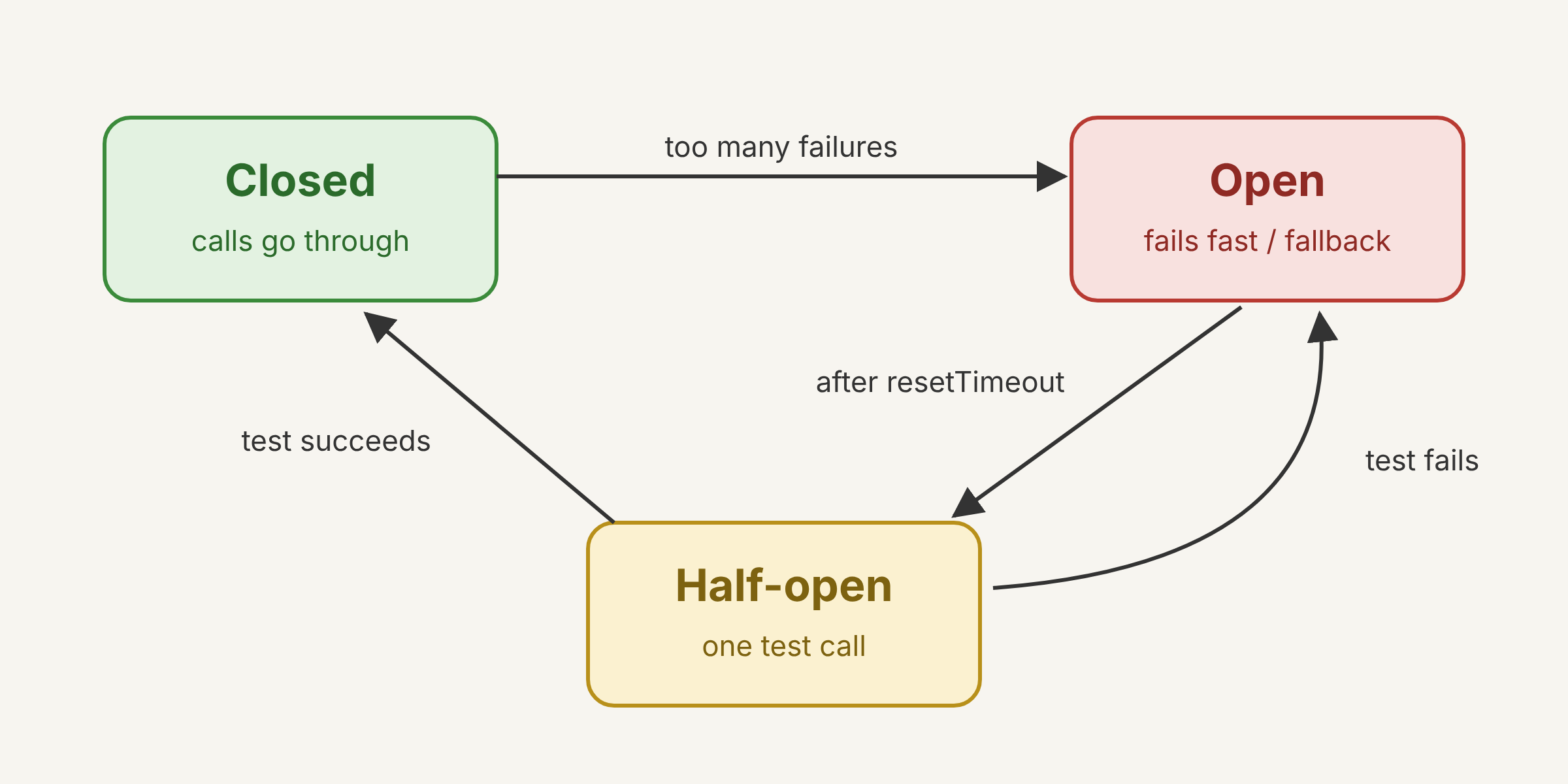 The three states of a circuit breaker
Green is normal operation, red protects the app while the service is sick, and yellow decides whether it has recovered.
import CircuitBreaker from 'opossum';

const breaker = new CircuitBreaker(getShippingQuote, {
  timeout: 3000,                // over 3 s counts as a failure
  errorThresholdPercentage: 50, // 50% errors opens the circuit
  resetTimeout: 30_000,         // after 30 s, tries half-open
});
breaker.fallback(() => ({ shipping: null, notice: 'Shipping calculated at checkout' }));

const shipping = await breaker.fire(zipCode);
Best solution: one breaker per external dependency (payment gateway, shipping API, email provider, LLM), with a short timeout, a useful fallback (a cached value, a friendly message, or queue it for later) and an alert when the circuit opens. Why: without it, a slow API ties up connections and workers waiting on timeouts, and your app goes down with it. With it, the failure stays contained to that feature and the rest of the SaaS keeps working.
30. Rate limiting
Limit how many requests a client makes per period. It protects against abuse, brute force and the "noisy" customer that takes down the other tenants. Common algorithms: fixed window, sliding window and token bucket (allows short bursts).
// fixed window with Redis: 100 requests per minute per API key
async function allowed(apiKey) {
  const key = `rl:${apiKey}:${Math.floor(Date.now() / 60_000)}`;
  const n = await redis.incr(key);
  if (n === 1) await redis.expire(key, 60);
  return n <= 100; // false -> HTTP 429 with a Retry-After header
}
In Nginx, you can block it before it reaches Node: limit_req_zone $binary_remote_addr zone=api:10m rate=10r/s;
Best solution: two layers: a per-IP limit in Nginx or Caddy to stop cheap abuse, and a token bucket in Redis per tenant or API key to enforce each plan's limits, always answering 429 with
Retry-Afterand remaining-limit headers. Why: the proxy stops attacks and brute force before they burn Node's CPU, and Redis guarantees the same limit across all instances. Limiting per tenant keeps a noisy customer from taking down the others.
Infra and scale
On a VPS, scale vertically first and use a reverse proxy with several app instances to use every core.
31. Load balancing
Spread requests across several app instances. Algorithms: round-robin (one each), least connections (whoever is freest) and IP hash (same client, same instance).
upstream app {
  least_conn;
  server 127.0.0.1:3001;
  server 127.0.0.1:3002;
  server 127.0.0.1:3003 max_fails=3 fail_timeout=30s; # taken out of rotation if it fails
}
server {
  listen 443 ssl;
  location / { proxy_pass http://app; }
}
It helps even on a single VPS: Node uses one core per process, so 4 processes use 4 vCPUs. Tools: Nginx, HAProxy, Traefik, Caddy.
Best solution: a proxy (Nginx, Caddy or Traefik) with
least_conn, automatic removal of failing instances and active checks on the readiness endpoint (built into Caddy and Traefik). Why:least_connsends each request to whoever is freest, which works better than round-robin when some requests take much longer than others. Taking failing instances out of rotation means a deploy or a stuck instance doesn't turn into an error for the user.
32. Horizontal scaling
Add more instances or machines. Prerequisite: a stateless app. Sessions in Redis or JWT, uploads in S3/MinIO, nothing important on local disk or in process memory.
Analogy: opening more checkout lanes at the supermarket.
docker compose up -d --scale app=4Pros: almost no ceiling, and it survives an instance going down. Cons: more moving parts (load balancer, shared cache, coordinated deploys).
Best solution: keep the app stateless from day one (sessions in Redis or JWT, files in S3 or MinIO, nothing important on disk or in process memory) and scale by adding containers behind the proxy. Why: when traffic grows, adding capacity becomes a command instead of a rushed refactor. Even on a single VPS, several instances allow zero-downtime deploys, swapping one at a time.
33. Vertical scaling
Put more CPU, RAM or disk on the same machine, for example going from a 4 vCPU/8 GB VPS to 16 vCPU/64 GB.
Analogy: replacing the cashier with a faster one.
Pros: zero code changes and no distributed complexity. Cons: it has a ceiling, usually needs a reboot and is still a single point of failure.
For the database of a small or medium SaaS, scaling vertically is almost always the right first step. A well-tuned Postgres on a good machine handles far more than it seems.
Best solution: scale vertically first, especially the database, until the cost or the machine's limit starts to hurt, tuning Postgres to the new hardware (
shared_buffers,work_mem,effective_cache_size). Why: it's the simplest and cheapest way to gain capacity, with no code changes and no distributed complexity. The catch is having backups and a tested restore plan, because it's still a single point of failure.
34. Reverse proxies
A server in front of your applications. It takes requests from the internet and passes them inside. It handles HTTPS, compression, static files, rate limiting and routing by domain, and hides the internal ports.
Analogy: the building's front desk. Visitors talk to the front desk and never wander the floors alone.
# Caddyfile: automatic HTTPS with Let's Encrypt
app.mysaas.com {
  reverse_proxy localhost:3000
}
api.mysaas.com {
  reverse_proxy localhost:4000
}
Reverse proxy vs. load balancer: balancing across several instances is just one of a reverse proxy's jobs.
Best solution: Caddy, for its automatic HTTPS and minimal config, or Traefik if you want to discover containers from Docker labels, sitting in front of everything with only ports 80 and 443 open in the firewall. Why: it centralizes TLS, routing, compression and limits in one place and hides the internal ports of the app, the database and Redis. Less exposed surface means less chance of someone finding an open Postgres or Redis on the internet.
Async processing
Anything slow or likely to fail (email, PDFs, AI, integrations) leaves the HTTP request and goes to a queue processed by workers.
35. Message queues
A producer puts messages on a queue and consumers process them at their own pace. It decouples whoever asks from whoever does the work, and absorbs traffic spikes.
Analogy: the order ticket at a diner. The cashier writes it down and keeps serving; the kitchen cooks in order.
import { Queue } from 'bullmq';
const emails = new Queue('emails', { connection: redis });

app.post('/signup', async (req, res) => {
  const user = await createUser(req.body);
  await emails.add('welcome', { userId: user.id },
    { attempts: 5, backoff: { type: 'exponential', delay: 1000 } });
  res.status(201).json(user); // the response doesn't wait for the SMTP server
});
Tools: BullMQ (Redis), pg-boss (Postgres), RabbitMQ, NATS, SQS and Kafka (event log).
Best solution: BullMQ if you already have Redis, or pg-boss if you'd rather keep everything in Postgres; RabbitMQ or Kafka only when there's a concrete need, like several services in different languages or a very high event volume. Why: the first two cover retries, delays, priorities and scheduling without running one more system on the VPS. Every extra piece is something to update, monitor and include in the backup.
36. Dead letter queues (DLQ)
Where messages go after failing every attempt. It keeps the message from being lost and stops a "poison" message from looping and jamming the queue.
Analogy: the post office's undeliverable mail bin.
const worker = new Worker('emails', processEmail, { connection: redis });

worker.on('failed', async (job, err) => {
  if (job.attemptsMade >= job.opts.attempts) {
    await dlq.add('email-failed', { original: job.data, error: err.message });
    // alert on Slack/Discord; someone investigates, fixes and resends
  }
});
In RabbitMQ and SQS this is built-in config (x-dead-letter-exchange and redrivePolicy).
Best solution: every job that runs out of attempts goes to a DLQ (in BullMQ, the
failedjob set itself works, as long as it isn't removed automatically), with an alert on Slack or Discord and a command or button to reprocess after the fix. Why: no failure disappears silently, and a bad message doesn't loop and jam the queue. Reprocessing lets you fix the bug and recover the lost jobs without asking the customer for anything.
37. Background workers
Processes separate from the API that consume the queues and do the heavy work: emails, PDFs, thumbnails, CSV imports, AI calls.
// worker.js: runs in another process or container
import { Worker } from 'bullmq';

new Worker('pdf', async (job) => {
  const pdf = await renderInvoice(job.data.invoiceId);
  await storage.upload(`invoices/${job.data.invoiceId}.pdf`, pdf);
}, { connection: redis, concurrency: 5 });# docker-compose.yml
services:
api:
build: .
command: node server.js
worker:
build: .
command: node worker.js
deploy:
replicas: 2Upside: the API and workers scale independently, and a slow PDF never blocks an HTTP request.
Best solution: workers in their own containers, using the same image as the API with a different command,
concurrencytuned to the kind of work (high for I/O, low for CPU) and graceful shutdown. Why: the API and workers scale separately, and a heavy job never steals CPU from an HTTP request. With graceful shutdown, deploys don't leave jobs half done.
38. Task scheduling
Run tasks at fixed or recurring times: monthly billing, a daily report, cleaning up expired sessions, the end-of-trial notice.
// BullMQ: repeatable job, every day at 03:00 UTC
await queue.add('clean-sessions', {}, {
  repeat: { pattern: '0 3 * * *', tz: 'UTC' },
});
Trap: with 3 app instances, a node-cron inside the code runs 3 times. Fixes:
- Schedule through the queue (BullMQ guarantees one run per slot).
- A single container dedicated to the scheduler.
- A Postgres lock:
SELECT pg_try_advisory_lock(42);and only whoever gets it runs.
Make the job idempotent too: if it runs twice, it can't charge twice.
Best solution: schedule through the queue, with BullMQ's repeatable jobs or pg-boss's
schedule, and write every scheduled job to be idempotent. Why: the queue guarantees one run per slot even with several instances and survives restarts, unlike an in-memory cron. Idempotency covers the rare duplicate run, so there's never a double charge.
Events and integrations
Events let parts of the system react without knowing about each other; webhooks are those events crossing the boundary between companies, which is why they need signatures and deduplication.
39. Event-driven architecture
A service announces that something happened (always in the past tense: order.paid) and whoever cares reacts. The sender doesn't know who's listening.
Analogy: the school bell rings and every class knows what to do. The bell doesn't call each room.
// the sender doesn't know who's interested
await bus.publish('order.paid', { orderId: 123, amount: 99.9 });

// each consumer reacts independently
bus.subscribe('order.paid', sendReceipt);
bus.subscribe('order.paid', grantAccess);
bus.subscribe('order.paid', updateMetrics); // added later, without touching checkout
Pros: loose coupling; adding a new reaction doesn't touch existing code. Cons: the flow gets harder to follow and debug (hence tracing, topic 50) and the data becomes eventually consistent.
Best solution: start with events inside a modular monolith, using a queue and an outbox, and only split out services when a module really needs to scale or deploy on its own. Why: you get the decoupling (adding new reactions without touching checkout) without the cost of running, versioning and debugging several services. For one person or a small team with a VPS, that operational cost is what weighs the most.
40. Webhook verification
Make sure the webhook came from who it says it came from, and not from someone forging the request. The sender signs the body with a shared secret (HMAC-SHA256); you recompute the signature and compare.
import crypto from 'node:crypto';

app.post('/webhooks/provider', express.raw({ type: 'application/json' }), (req, res) => {
  const received = req.header('X-Signature') ?? '';
  const expected = crypto.createHmac('sha256', process.env.WEBHOOK_SECRET)
    .update(req.body) // RAW body: re-serialized JSON changes the bytes and breaks the signature
    .digest('hex');

  const ok = received.length === expected.length &&
    crypto.timingSafeEqual(Buffer.from(received), Buffer.from(expected)); // avoids timing attacks
  if (!ok) return res.status(401).end();

  const event = JSON.parse(req.body);
  // ...
});
Include a timestamp in the signature and reject events older than 5 minutes, to prevent replays. With Stripe, use stripe.webhooks.constructEvent, which already does all of this.
Best solution: use the provider's official SDK (like
stripe.webhooks.constructEvent) on the raw request body; for the webhooks your SaaS sends, sign with HMAC-SHA256 including a timestamp. Why: the SDK already checks the signature and timestamp and compares in constant time, so you don't reinvent crypto. The most common mistake is parsing the JSON before verifying, which changes the bytes and makes every signature fail.
41. Webhook retries
When you receive them: the provider resends if you don't answer 2xx quickly. The same event can arrive several times and out of order.
- Answer 200 fast and process in a queue.
- Deduplicate by event ID.
- Don't trust the order: check the current state (e.g. ignore a
subscription.updatedolder than the last one applied).
const r = await db.query(
  'INSERT INTO webhook_events (event_id, payload) VALUES ($1, $2) ON CONFLICT DO NOTHING',
  [event.id, event]);
if (r.rowCount === 0) return res.sendStatus(200); // duplicate: already received
await queue.add('process-webhook', { eventId: event.id });
res.sendStatus(200);
When your SaaS sends webhooks to customers:
- A queue with exponential backoff and jitter (for example 1 min, 5 min, 30 min, 2 h, 12 h).
- Disable the endpoint after many failures in a row and let the customer know by email.
- Show a dashboard with the delivery history and a resend button.
Best solution: when receiving, store the event by its unique ID, answer 200 in milliseconds and process it in a queue idempotently, checking the current state instead of trusting arrival order. Why: duplicates become no-ops, the provider never gets a timeout, and out-of-order events don't overwrite new data with old. When sending, a queue with backoff, a delivery history and a resend button cut support tickets a lot.
Distributed systems
When data lives in more than one place, "all or nothing" stops being free; these patterns win back enough guarantees without a global transaction.
42. Eventual consistency
After a change, not every part of the system shows the new value right away, but they all converge shortly.
Analogy: you change your profile picture and your friends see the new one a few seconds later.
Everyday examples: a read replica with lag, a search index (Meilisearch, Elasticsearch) updated through a queue, a like counter recalculated every minute.
In the UI: optimistic updates (show the new value right away) and states like "processing...".
Best solution: accept eventual consistency where the user doesn't notice (search, metrics, counters, emails, notifications) and keep strong consistency for money, permissions and plan limits, showing states like "processing" when there's a wait. Why: money and access data are where a stale value causes real losses or a security hole. Everywhere else, a few seconds of delay are invisible and allow a much simpler, faster system.
43. Distributed transactions
An operation that must be atomic across several databases or services, for example charging in the payments service and reserving in the inventory service.
- 2PC (two-phase commit): a coordinator asks "everyone ready?" and then says "commit". Guaranteed, but slow, and it locks everything if the coordinator dies. Rare in microservices.
- Saga: a sequence of local transactions. If a step fails, compensating actions run to undo the previous ones.
"Checkout" saga
1. Reserve stock    -> compensation: release stock
2. Charge card      -> compensation: refund
3. Create shipment  -> FAILED
   => runs: refund, then release stock
Rule of thumb: if you can keep everything in a single Postgres, do. It's by far the simplest solution.
Best solution: avoid them, keeping data that must change together in the same Postgres; when an external service is involved (a payment gateway, for example), use a saga with compensations and an idempotency key on every step. Why: 2PC is fragile, slow and locks resources if the coordinator dies, while a local transaction is simple and reliable. The saga accepts that something may fail halfway and defines up front how to undo each step.
44. Outbox pattern
Solves "I saved to the database but the event never got published" (or the other way around). Instead of publishing straight to the queue, it writes the event to an outbox table in the same transaction as the data. A separate process reads the outbox and publishes.
// 1. data + event in the same transaction: both or neither
await db.tx(async (t) => {
  const order = await t.one('INSERT INTO orders (...) VALUES (...) RETURNING *');
  await t.none('INSERT INTO outbox (type, payload) VALUES ($1, $2)', ['order.created', order]);
});

// 2. relay: runs in a loop in a worker
await db.tx(async (t) => {
  const events = await t.any(`
    SELECT * FROM outbox WHERE published_at IS NULL
    ORDER BY id LIMIT 100 FOR UPDATE SKIP LOCKED`);
  for (const e of events) await queue.add(e.type, e.payload);
  await t.none('UPDATE outbox SET published_at = now() WHERE id = ANY($1)', [events.map(e => e.id)]);
});
It guarantees "at least once" delivery, so consumers need to be idempotent. An alternative without polling: CDC with Debezium reading the Postgres WAL.
Best solution: write the event to an outbox table in the same transaction as the data and publish it with a relay using
FOR UPDATE SKIP LOCKED, periodically cleaning up rows already published. Why: no event gets lost and no event goes out without the data having been saved, with nothing beyond the Postgres you already have. Since delivery is "at least once", consumers need to be idempotent.
45. CQRS
Separate the write model (commands: checks rules, stores normalized data) from the read model (queries: data ready for the screen, denormalized).
Analogy: the kitchen and the menu. The customer reads the menu without needing to know how the kitchen is organized.
// command: business rules on the normalized tables
async function completeOrder(cmd) { /* validates, stores order + items, emits event */ }

// projection: keeps a table ready for the dashboard
on('order.completed', (e) => db.query(
  `INSERT INTO sales_dashboard (tenant_id, day, total) VALUES ($1, $2, $3)
   ON CONFLICT (tenant_id, day) DO UPDATE SET total = sales_dashboard.total + $3`,
  [e.tenantId, e.day, e.amount]));

// query: a trivial, fast read
const sales = await db.query('SELECT * FROM sales_dashboard WHERE tenant_id = $1', [tid]);
Light version: a MATERIALIZED VIEW refreshed every so often already separates reads from writes. It's only worth the effort when reads and writes have very different needs.
Best solution: apply it only where it hurts: read tables updated by events, or materialized views with
REFRESH MATERIALIZED VIEW CONCURRENTLY, for heavy dashboards and reports, leaving the rest of the system with a single model. Why: you get fast reads where they matter without rewriting the whole domain or keeping two models for every screen. Full CQRS only pays off when reads and writes have very different loads and shapes.
46. Event Sourcing
Instead of storing only the current state, it stores every event that happened. The state is computed by replaying the events.
Analogy: a bank statement. The balance is the sum of every transaction.
// append-only table: never UPDATE, never DELETE
const events = [
  { account: 42, type: 'Deposited', amount: 100 },
  { account: 42, type: 'Withdrawn', amount: 30 },
  { account: 42, type: 'Deposited', amount: 50 },
];

const balance = events.reduce((s, e) =>
  e.type === 'Deposited' ? s + e.amount : s - e.amount, 0); // 120
Pros: a full audit trail, "time travel", and the ability to build new views from history. Cons: complex, evolving the event format is hard, it needs snapshots and almost always comes with CQRS. Use it where history is the product (finance, accounting); for most SaaS, an audit_log table does the job.
Best solution: for most SaaS, don't; keep normal tables and an append-only
audit_logthat records who did what, when, and the values before and after. Why: that delivers the audit trail and history the business usually asks for at a fraction of the complexity. Real event sourcing only pays off where history is the product itself, like accounting, wallets and ledgers.
Running in production
These four make the difference between a calm deploy and an incident at 3 a.m.: holding the load, shutting down carefully, knowing who's healthy and seeing where the time goes.
47. Backpressure
When the consumer can't keep up, it signals the producer to slow down, instead of piling everything up in memory until it bursts.
Analogy: the supermarket conveyor belt. If the cashier can't keep up, the belt stops and you wait before putting more groceries on it.
// Node streams already do backpressure: reading pauses if writing is slow
import { pipeline } from 'node:stream/promises';
await pipeline(fs.createReadStream('import.csv'), parseCsv(), saveInBatches());

// workers: concurrency limits how much is pulled from the queue at a time
new Worker('import', processRow, { connection: redis, concurrency: 10 });
In the API, returning 429 or 503 with Retry-After when the internal queue is full is backpressure applied to the client.
Best solution: put limits everywhere (pool size, worker
concurrency, streams instead of loading whole files, a max size for in-memory queues) and answer 429 or 503 withRetry-Afterwhen full. Why: refusing early and in a controlled way is much better than the process running out of memory and killing every request in flight. The client gets a clear signal to try later, instead of a timeout.
48. Graceful shutdown
When it gets the stop signal (a deploy, a restart), the process stops accepting new work, finishes what's in progress and closes its connections. Without this, it dies in the middle of a request or a job.
const server = app.listen(3000);

process.on('SIGTERM', async () => {
  setTimeout(() => process.exit(1), 25_000).unref(); // never hangs
  server.close();        // stops accepting new connections
  await worker.close();  // waits for jobs in progress
  await pool.end();      // closes Postgres
  await redis.quit();
  process.exit(0);
});
Docker details:
- Docker sends
SIGTERMand, after 10 s,SIGKILL. Adjust it withstop_grace_period. - With
npm startinCMD, the signal may never reach Node. UseCMD ["node", "server.js"]orinit: true. - Mark readiness as failing first (topic 49), so the proxy stops sending traffic.
Best solution: on SIGTERM, mark readiness as failing, wait a few seconds for the proxy to stop sending traffic, drain in-flight requests and jobs, close connections, and keep a safety timeout shorter than
stop_grace_period. Why: deploys and restarts stop killing requests and jobs halfway. Without it, every deploy causes a small spike of 502s and repeated jobs nobody can explain.
49. Health checks
Endpoints that say whether the instance is alive and ready. There are two kinds:
- Liveness (
/healthz): is the process responding? If not, restart the container. - Readiness (
/readyz): can it serve right now (database and Redis reachable)? If not, the load balancer stops sending traffic, without restarting.
app.get('/healthz', (req, res) => res.send('ok'));

app.get('/readyz', async (req, res) => {
  try {
    await Promise.all([pool.query('SELECT 1'), redis.ping()]);
    res.send('ready');
  } catch {
    res.status(503).send('not ready');
  }
});# docker-compose.yml
healthcheck:
test: ["CMD", "wget", "-qO-", "http://localhost:3000/healthz"]
interval: 10s
timeout: 3s
retries: 3Careful: don't put the database in the liveness check. If Postgres goes down, restarting the app in a loop fixes nothing. To monitor from outside, Uptime Kuma runs fine on the VPS itself.
Best solution: a simple liveness check with no dependencies to restart stuck processes, a readiness check on the database and Redis to take the instance out of the balancer, and a monitor running outside the VPS (Uptime Kuma on another machine or an uptime service) to warn you when everything goes down. Why: each one answers a different question: is the process alive, can the instance take traffic, and can the user reach it. Mixing the first two causes restart loops every time the database wobbles.
50. Distributed tracing
Follow a request end to end across services, queues and databases. Each request gets a trace ID, and each step becomes a span with a start, a duration and attributes. The result is a waterfall that shows where the time went.
POST /checkout                        820 ms
|- auth middleware                      5 ms
|- SELECT cart (Postgres)              12 ms
|- POST api.payments.com              640 ms   <- the bottleneck
|- queue.add('email')                   3 ms
|- worker: send-email 300 ms (same trace, another process)// tracing.js: load it before everything -> node --import ./tracing.js server.js
import { NodeSDK } from '@opentelemetry/sdk-node';
import { getNodeAutoInstrumentations } from '@opentelemetry/auto-instrumentations-node';
import { OTLPTraceExporter } from '@opentelemetry/exporter-trace-otlp-http';
new NodeSDK({
serviceName: 'api',
traceExporter: new OTLPTraceExporter({ url: 'http://localhost:4318/v1/traces' }),
instrumentations: [getNodeAutoInstrumentations()], // http, express, pg and redis automatically
}).start();The ID travels between services in the traceparent header (W3C standard). To self-host: Jaeger, Grafana Tempo or SigNoz. Write the trace ID on every log line so you can jump from the log to the trace in one click.
Best solution: OpenTelemetry with auto-instrumentation in the API and the workers, exporting to Grafana Tempo or SigNoz on your VPS, with the trace ID written on every log line. Why: it's the open standard, with no vendor lock-in, and it already covers HTTP, Express, Postgres and Redis without code changes. Linking logs and traces by the same ID turns "why was that checkout slow?" into one click.